How to Choose the Right Features for Your Team’s Coffee Habits

Understand staff preferences: espresso, latte, or black? Tailoring features to demand
Let’s be honest: a one-size-fits-all coffee machine rarely satisfies an entire office. If your team runs on caffeine, the machine you pick needs to match their specific tastes—not just churn out cup after cup of generic brew.
Start by figuring out what your staff actually drink. This isn’t about guesswork. It’s about real habits. Take a quick poll. Do most prefer flat whites, americanos, or something with frothy milk on top? Does your team lean towards strong espresso shots for quick energy, or are they sipping large mugs of black coffee throughout the day?
A fresh bean coffee machine with customisable drink options can cater to mixed preferences without requiring a barista-level skill set. If half your team wants lattes and the other half just wants strong black coffee, you’ll need built-in milk frothers and adjustable strength settings.
Here’s what to look for:
- Programmable drink profiles: Ideal for offices with diverse coffee preferences. Staff can save their own go-to drinks. No fumbling with settings every morning.
- Adjustable brew strength and cup size: Big mugs, small shots – everyone wins.
- Integrated milk systems: Steam wands work, but automatic milk frothers are faster and cleaner.
The best office coffee machines let employees make their favourite drink at the push of a button. That’s a morale booster and productivity hack rolled into one. If your current setup has people queuing at the local café, it’s time to upgrade.
Also consider dietary needs. Oat, almond, and soy milk preferences are growing. Machines with external milk systems make it easier to swap in alternatives without cross-contamination.
The takeaway? Match features with real demand. You’re not choosing a coffee machine for yourself. You’re investing in a workplace coffee solution that keeps your entire team energised and engaged.
Why drink volume matters: selecting machines based on team size and consumption
Underestimating how much coffee your office consumes is a rookie mistake. It leads to frustrated staff, constant refills, and machines that can’t keep up.
Volume matters. A lot.
Before choosing a machine, look at your team size and average daily consumption. A 5-person team will have very different needs than a 50-person one. But it’s not just about headcount—it’s about habits. Some teams sip slowly. Others power through multiple cups before lunch.
Use this rough guide:
- Small teams (5–10 people): A compact fresh bean coffee machine with a refillable water tank should do the job.
- Medium teams (10–30 people): Go for a commercial coffee machine with larger bean hoppers and water tanks. Dual dispensers speed things up.
- Large teams (30+ people): You’ll want a high-capacity workplace coffee machine with a plumbed-in water supply, fast brewing cycles, and automatic cleaning.
Don’t forget peak times. Morning rushes and mid-afternoon slumps are real. Machines with slow brewing speeds can create bottlenecks. That’s lost time and rising irritation.
Dual dispensers or machines with queue-based brewing systems can keep things flowing. Some commercial machines brew in under 20 seconds per cup—with no quality loss. That’s the gold standard.
Also think about bean hopper and grounds bin capacity. If the machine needs constant refilling or emptying, it’s eating into someone’s day. That may not seem like much—until you realise it’s a hidden cost in admin time and productivity.
Choosing the right size machine isn’t just about convenience. It’s about showing your staff that their time matters. And it’s about protecting your investment. Overworking a light-use machine in a high-demand office? That’s a fast track to breakdowns and repair bills.
Built-in grinders, milk frothers and dual dispensers: what features deliver the most value?
When you’re comparing office coffee machines, you’ll see a long list of features. Some are game-changers. Others are just fluff. The trick is knowing which features actually increase daily value—and which ones look good on paper but flop in practice.
Start with the grinder.
A built-in grinder is essential if you’re using fresh beans. Pre-ground coffee loses aroma fast. A grinder preserves flavour, ensures consistency, and lets you adjust grind size for different strengths. Burr grinders are best. They deliver even particle size, which means better extraction and better taste.
Next up: milk systems.
If your staff drink cappuccinos, lattes, or flat whites, a built-in milk frother is non-negotiable. But not all milk systems are equal.
- Manual steam wands offer control but take time and skill.
- Auto milk frothers are faster, cleaner, and more consistent.
- Some machines offer both, which is perfect if you have a mix of preferences in the office.
Look for machines with self-cleaning milk circuits. Milk is messy. If it’s not cleaned properly, it turns into a hygiene issue fast. A system that rinses after every use or shuts down if not cleaned? That’s peace of mind.
Now let’s talk dual dispensers.
If your office has more than a handful of coffee drinkers, dual dispensers are a massive time saver. They brew two cups at once—doubling output without sacrificing quality. It’s especially useful during the morning rush. No more queues forming in the kitchen.
Bonus features that earn their keep:
- Heated cup trays: Keeps drinks hotter for longer. Especially useful in winter.
- Separate hot water spouts: Essential for tea drinkers or instant soups.
- Adjustable spouts: Accommodate mugs, travel cups, and espresso glasses.
Here’s the test: ask yourself how each feature saves time or improves the user experience. If it doesn’t tick either box, it’s probably not worth the cost.
You’re buying more than a coffee machine. You’re investing in a workplace coffee solution that improves daily flow, boosts morale, and reduces interruptions. Every feature should serve that purpose.
And remember—your team will be using this machine multiple times a day, every day of the week. The right features make that experience seamless. The wrong ones turn it into a source of frustration.
In short:
– Choose a machine with a grinder if you’re using fresh beans.
– Invest in an automatic milk frother for speed and hygiene.
– Go for dual dispensers if you’ve got more than ten regular coffee drinkers.
This isn’t about bells and whistles. It’s about building a workplace coffee setup that works—without micromanagement, without daily complaints, and without wasting your team’s time.
How to Identify Time-Saving, Low-Maintenance Functions That Actually Work
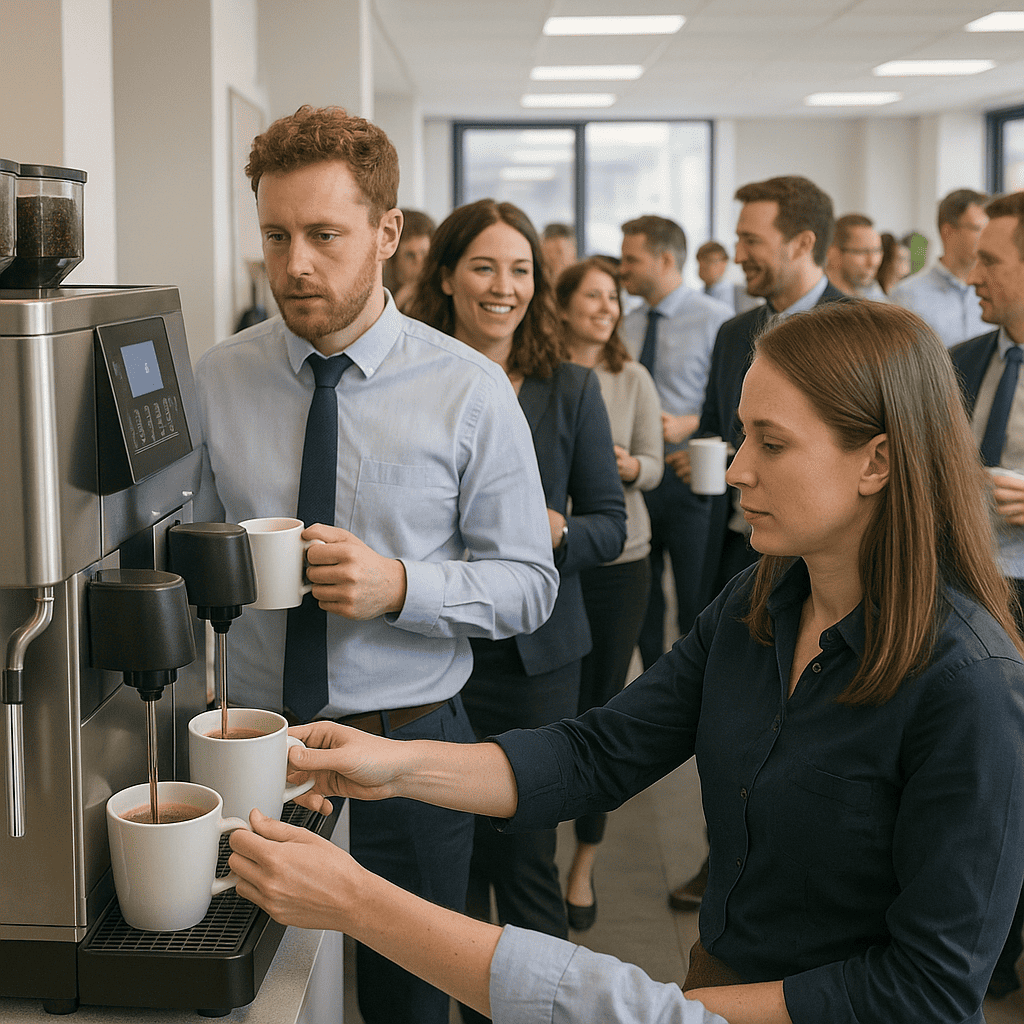
Self-cleaning cycles and easy descaling: features that free up your team’s time
You don’t want your office coffee machine turning into another time-wasting chore. The problem is, many machines look slick on the outside but hide a monster of maintenance underneath. You’re not hiring staff to play barista or janitor. The best commercial coffee machines come with self-cleaning cycles and automatic descaling functions that actually save you time—and money.
Look for machines with programmable cleaning schedules. These run internal rinse and sanitise cycles without needing someone to pull the machine apart. Some models even send alerts when they need attention. That’s the kind of automation that keeps your team focused on meetings, not manuals.
Scaling is another silent killer. Over time, limescale builds up—especially in hard water areas—and wrecks performance. Worse, it shortens the lifespan of even high-end machines. Machines with built-in descaling programs take care of that without needing to be dismantled. Just add a descaling solution, press a button, and let it run. In high-consumption offices, this is non-negotiable.
If you’re managing a team that churns through 20, 30, or even 50 cups a day, choose a coffee machine that handles the workload without demanding constant cleaning. Bonus points if it has removable, dishwasher-safe parts for quick manual cleaning when needed. This kind of low-maintenance feature is pure gold for busy office managers who don’t want to babysit the break room.
Want a deeper look at how these features fit into the bigger picture? You’ll find everything in the Ultimate Guide to Choosing the Best Office Coffee Machine for Your Workplace.
Touchscreen displays vs manual buttons: which interface improves daily usability?
Here’s a truth most brands skip: a bad user interface turns even the best office coffee machine into a liability. You want something your team can use instinctively, whether they’re tech-savvy or not. That’s where the battle between touchscreen displays and manual buttons gets interesting.
Touchscreens look modern, and they’re often packed with customisation options. You can programme coffee strength, milk ratio, temperature, and even cup size. If you’ve got a team that values variety—flat whites, Americanos, oat milk lattes at 10:03 sharp—touchscreens are ideal.
But there’s a catch. Some touchscreens lag, glitch, or require a learning curve. That’s a problem in fast-paced offices where people just want coffee, not a tutorial. If you go touchscreen, make sure it’s responsive, intuitive, and clearly labelled. Machines with icon-based navigation often work best. Look for models with memory settings so team members can save their preferred brew with one tap. That’s a small feature, but it creates a big daily win.
Manual buttons, on the other hand, are all about speed. No menus to scroll through. Just press and pour. If your team mostly drinks black coffee or espresso and doesn’t need endless customisation, a well-designed manual interface might be the smarter choice. It reduces user error and keeps queues moving.
A hybrid machine—touchscreen for custom drinks, manual buttons for quick brews—offers the best of both worlds. It’s worth considering if your office has a wide range of coffee preferences and time constraints.
Whichever route you go, the interface should feel like an upgrade, not a burden. Poor usability leads to frustration, spills, and ultimately, low machine usage. That’s wasted investment. The goal is simple: make great coffee easy to access, fast to prepare, and foolproof to use.
Water supply options: plumbed-in vs refillable tank for hassle-free operation
Water supply seems like a boring spec—until you’ve had to refill a tank four times before 11 a.m. The type of water system your office coffee machine uses will directly impact daily convenience, maintenance, and even coffee taste.
Plumbed-in machines are the go-to choice for high-traffic offices. They connect directly to your building’s water supply, so there’s no refilling required. Once installed, they’re virtually set-and-forget. This is a serious time-saver for offices with 20+ employees or for any workplace where the coffee machine sees constant use throughout the day.
But installation can be a hurdle. You’ll need access to plumbing, which may not be feasible in all office layouts. There’s also the upfront cost of installation, though many suppliers include it in their service packages. If your budget allows and your team drinks a lot of coffee, a plumbed-in system is worth the investment.
Refillable tank machines are more flexible. You can place them anywhere with a power socket. That’s a win for smaller offices, startups, or co-working spaces where kitchen space is limited. The trade-off? Someone needs to keep an eye on water levels—and refill when it runs low. In busy offices, this can quickly become a daily annoyance.
There’s also a middle ground: some machines offer optional plumbing kits, so you can start with a tank and upgrade to a plumbed-in setup later. This is ideal if you’re planning for team growth or moving to a bigger space soon.
Water quality matters too. If you’re in a hard water area, a built-in filtration system is essential. It improves the taste of the coffee and protects the internal components from limescale build-up. Some machines include water hardness test strips and let you adjust settings accordingly. That’s a small detail that makes a big difference over time.
The right water setup depends on your team size, layout, and usage patterns. But ignoring this feature is a mistake. A poorly chosen water system leads to interruptions, maintenance issues, and potential damage to the machine. For a true workplace coffee solution, choose a machine that matches your rhythm—not one that slows you down.
How to Future-Proof Your Coffee Investment with Smart and Scalable Features
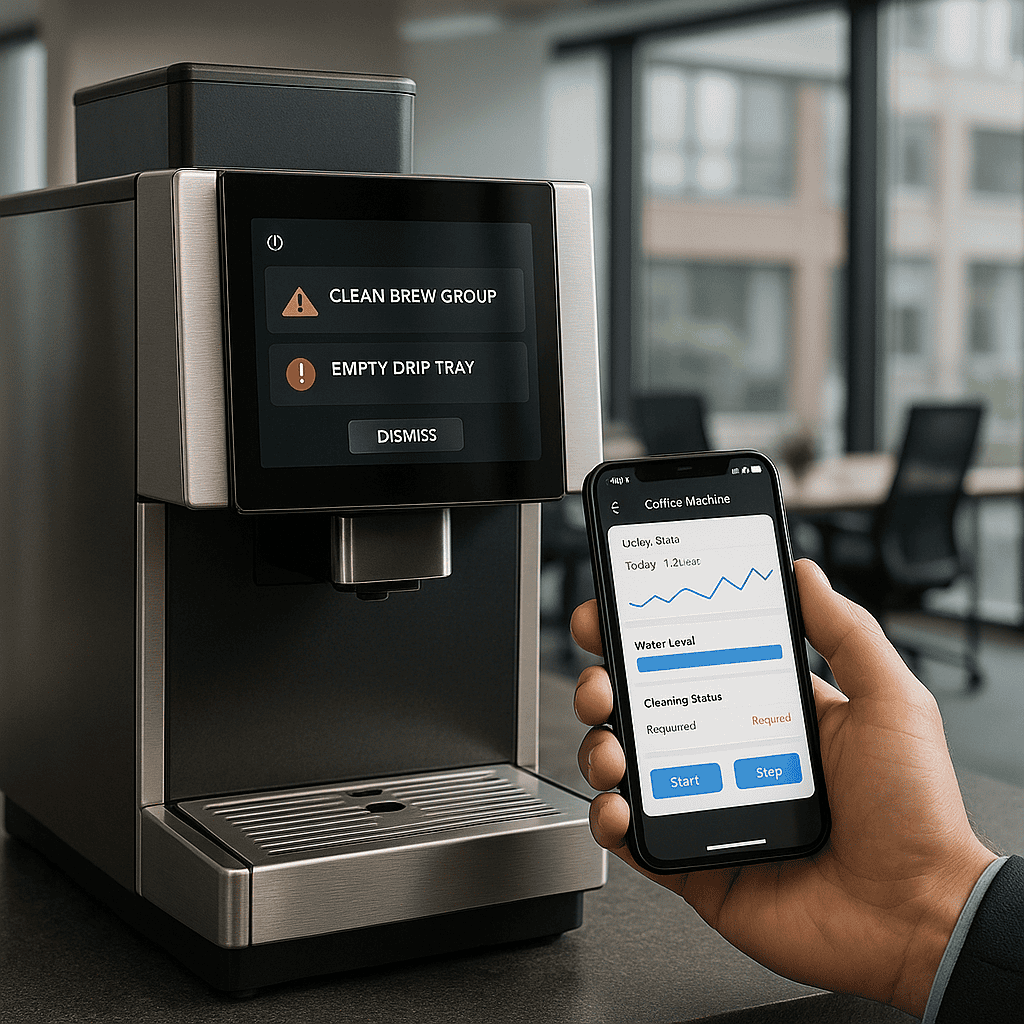
Smart connectivity: how app control, usage tracking and maintenance alerts add value
You don’t want to spend your mornings troubleshooting a coffee machine. You’ve got meetings to prep for, clients to impress, and a team that doesn’t function without caffeine. That’s where smart connectivity changes the game.
The best office coffee machines today offer app integrations, Wi-Fi connectivity, and cloud-based dashboards. Sounds fancy, but here’s why it matters: imagine getting a notification when the machine is running low on beans, scheduling maintenance before it breaks down, or tracking usage patterns to understand peak times. This isn’t just a gadget—it’s a workplace coffee solution that puts control in your hands and reduces downtime.
For example, smart coffee machines let you restrict or personalise drink options per user. That means your finance director can stick to black americanos while your creative team can froth their almond milk lattes to perfection—all without fiddling with settings every time.
Want to monitor your machine remotely? No problem. With app control, you can adjust settings, start cleaning cycles, or even reorder supplies from your desk. You’re not just saving time—you’re eliminating friction.
For office managers juggling dozens of responsibilities, usage tracking is invaluable. It gives you data. Real numbers. You’ll know exactly how many cups are brewed daily, which drinks are most popular, and when usage spikes. This helps you make smarter decisions about bean orders, machine capacity, and even staff perks.
Maintenance alerts are another unsung hero. Rather than waiting for the machine to grind to a halt mid-morning (cue chaos), you get proactive alerts. A simple heads-up to descale or replace a filter can prevent expensive repairs. Think of it as a risk-management feature.
This tech isn’t just for show. It’s about making your office coffee setup as seamless and stress-free as possible. And if you’re managing multiple office locations, centralised control through a dashboard becomes a strategic advantage. You can standardise drink quality, monitor performance, and reduce waste—all without leaving your desk.
If you’re investing in a commercial coffee machine, smart features aren’t a luxury. They’re the new standard for workplace coffee machines that actually deliver.
Modular components and upgrade options: plan for growth without full replacement
Your office isn’t static. Maybe you’re a 20-person startup today. Maybe you’ll be 120 by next year. The last thing you need is to replace your entire coffee system every time you grow. That’s where modularity earns its keep.
A modular office coffee machine is built like Lego—components can be added, removed, or upgraded without ditching the whole unit. Start with a bean-to-cup base unit. Add a milk module when your team outgrows black coffee. Add a payment system if you’re running a shared office or co-working space.
This scalability isn’t just about size. It’s about flexibility. You can swap out a worn grinder without replacing the brewer. You can upgrade the milk frother for plant-based options. You can even add dual dispensers to speed up service during peak hours. It’s plug-and-play for the workplace.
Directors and business owners should see modularity as future-proofing. You lock in value for the long-term and avoid the cost sink of full replacements. That’s smart budgeting.
Office managers love this feature for another reason: less disruption. You don’t need to schedule a full-day installation or retrain staff. Just clip in the new component, and you’re back to brewing in minutes.
Some commercial coffee machines even offer software-based upgrades. Want to add new drink recipes? Download them. Need to restrict usage during off-hours? Update the settings. The machine evolves with your needs.
In a fast-moving business environment, being able to adapt quickly is a competitive edge. Your coffee setup should match that pace. A modular system ensures your workplace coffee solution grows with you, not against you.
Look for machines with easily replaceable parts, clear upgrade paths, and compatibility with accessories. It’s a small detail with huge ROI.
Energy-saving modes and auto shut-off: cut costs without cutting quality
Let’s talk about something unsexy but powerful: energy efficiency. It’s not just about saving the planet (though that’s a bonus). It’s about cutting operating costs without compromising on quality.
Office coffee machines that run 24/7 bleed electricity. It’s like leaving the lights on in a building no one’s using. Enter energy-saving modes.
Many of today’s best office coffee machines come with automatic shut-off features, low-power standby modes, and programmable sleep settings. These features kick in during off-hours—overnight, weekends, or even low-use periods during the day.
If you’re a business owner watching the bottom line, these savings add up. A single commercial coffee machine running inefficiently can cost hundreds in wasted electricity over the year. Multiply that across multiple sites or machines, and you’re haemorrhaging cash.
Auto shut-off is a standout feature. It powers down the machine after a set time of inactivity. No more worrying about the last person forgetting to switch it off. Some machines even detect ambient activity—if no one’s in the office, it powers down automatically.
Standby modes are another energy-saving win. The machine stays warm enough for a fast restart but uses minimal power. That way, your team still gets their coffee fast, but you’re not burning through kilowatts to keep water boiling all day.
And here’s the kicker—energy-efficient machines also last longer. Overheating and constant cycling wear down components. By reducing strain, you extend the lifespan of the machine. That’s fewer repairs, fewer replacements, and more value from your investment.
Office managers should also consider machines with insulated boilers and smart heating systems. These retain heat better and only activate when needed. Look for machines rated with energy labels or certifications—these aren’t just marketing fluff. They indicate real, measurable efficiency.
If sustainability is part of your corporate values, these features double as a branding win. You can show staff and clients that you’re making conscious choices—even in the break room.
Energy-saving functions are no longer optional. They’re essential features in any workplace coffee solution that’s designed for the long haul.
—
To learn more about how to provide fresh bean coffee in the office at the press of a button, visit Office Coffee Machines.