Table of Contents
- Why Workplace Morale Drives Productivity in Shared Offices
- How to Improve Workplace Morale: A Step-by-Step Plan
- Co-working Space Amenities That Members Actually Value
- Ways to Reduce Distractions at Work in a Shared Office
- Co-working Space Productivity Tips for Operators and Members
- Designing for Comfort: Ergonomics, Lighting and Air Quality
- Measuring Morale and Productivity: What to Track
- Frequently Asked Questions
Last Updated: October 20, 2026
Why Workplace Morale Drives Productivity in Shared Offices
Workplace morale is the collective attitude, motivation and satisfaction of the people who use a workspace. In a shared office, it rises or falls on small daily experiences: noise levels, comfort, facilities and a sense of belonging.
This guide from Admiral Vending sets out a practical, step-by-step plan to improve workplace morale and productivity for co-working spaces. Below, we show you exactly how to audit a space, fix the basics and add the amenities members actually value.
The link between member experience and output
The connection is simple. Members who feel comfortable and looked after stay longer, renew more often and recommend the space to others. A common mistake operators make is treating morale as a soft extra rather than a business metric.
Think about the last time you worked somewhere noisy and cramped. How much deep work did you get done? Probably very little.
- Poor comfort leads to shorter sessions and early departures
- Constant distractions break focus and slow tasks down
- Weak communal spaces reduce conversation and connection
- Small frustrations, like a slow drinks machine, add up over a week
Improve those experiences and output tends to follow. It is not magic; it is cause and effect.
How to Improve Workplace Morale: A Step-by-Step Plan
The fastest route to better morale is a short, structured plan with clear owners and review points. Do not guess what members want. Ask them, then fix the obvious problems before spending on extras. The phased approach below is designed for space operators rather than individual members, and it builds in feedback loops so you can adjust as you go.
Step 1: Audit the space and ask members what is missing
Walk the floor at different times of day. Note noise hotspots, cramped desks, poor lighting and any facilities that look tired or broken. Record what you find in a simple spreadsheet with columns for location, issue, severity and suggested fix.
Then run a short survey or a quick chat at reception. Ask three questions:
- What stops you doing your best work here?
- Which facilities do you use most, and which do you avoid?
- What one change would make your week better?
Keep it short. A few honest answers beat a long form nobody finishes. Aim for a response rate of at least a third of active members; if it is lower, offer a small incentive such as a free coffee or entry into a prize draw.
Audit at peak times, not at 9am on a quiet Monday. The problems members complain about are far easier to spot when the space is full.
Step 2: Fix the basics, then add comfort and community
Rank your findings by effort and impact. Fix the cheap, high impact items first: a wobbly chair, a flickering light, a noisy meeting room door. Assign each fix to a named person and set a target date. A simple action log shared with the team keeps momentum. Clear wayfinding and labels also prevent unnecessary interruptions, demonstrating how office signage impact contributes to a more focused and efficient professional environment.
Once the basics are solid, move to comfort and community. That means better seating, a proper quiet room, and a drinks setup people actually enjoy using. Here is a simple priority order with suggested owners and review points:
| Priority | Action | Effort | Impact | Suggested owner | Review point |
|---|---|---|---|---|---|
| 1 | Fix broken furniture and lighting | Low | High | Facilities manager | Weekly until closed |
| 2 | Add a quiet room or focus zone | Medium | High | Space manager | After one month |
| 3 | Improve drinks and refreshments | Medium | High | Operations lead | After two weeks |
| 4 | Run regular community events | Medium | Medium | Community manager | Quarterly |
| 5 | Add wellness sessions | Higher | Medium | Community manager | Quarterly |
Step 3: Run a feedback loop and adjust
A plan without a feedback loop is just a wish list. After each change, ask members whether it made a difference. A short pulse survey two weeks after a fix is usually enough. Compare the results with your baseline audit and adjust the priority order if something is not working.
Set a regular review rhythm: a fortnightly check-in with the operations team and a quarterly review with members. This keeps the plan alive and shows members their feedback leads to action, which itself lifts morale.
Do not launch every change at once. Members need time to notice and use new facilities, and you need clean feedback on what worked. Stagger changes by at least two weeks.
Step 4: Communicate what you have done
Members rarely notice quiet fixes. A short noticeboard update or email listing what changed and what is next builds trust and encourages more feedback. It also signals that the space is managed, not just maintained.
Co-working Space Amenities That Members Actually Value
The amenities that matter most are the ones members use every day. Reliable internet, a quiet room and good refreshments top most wish lists. Fancy extras rarely beat the basics done well.
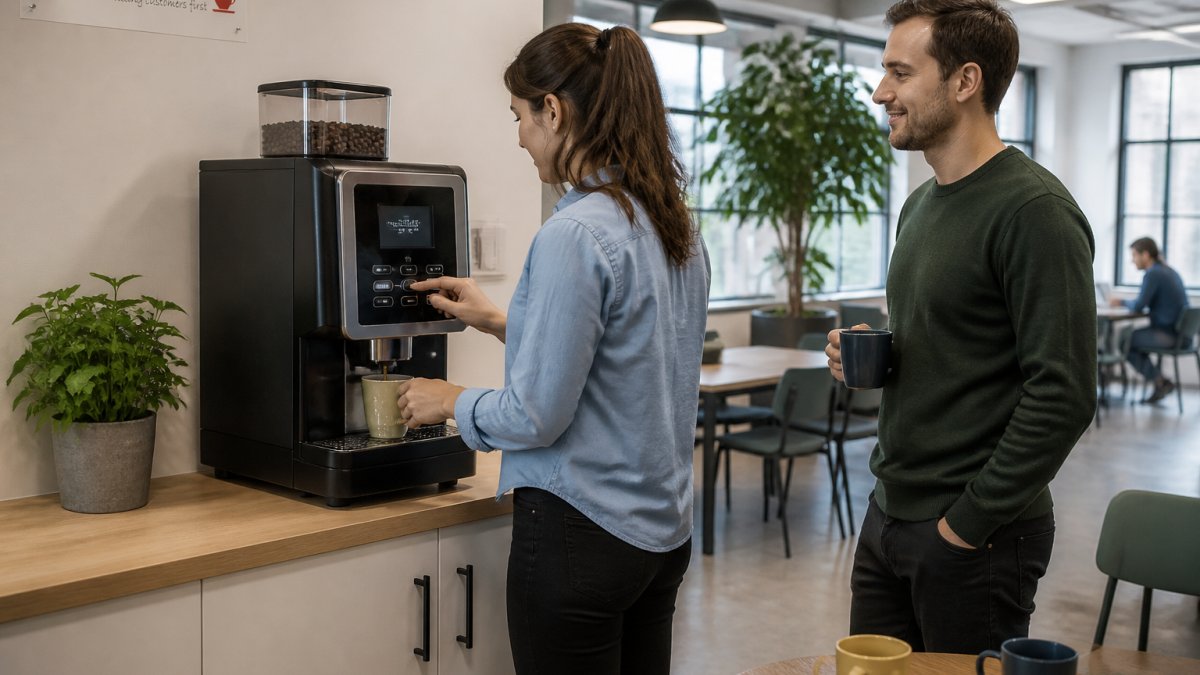
Refreshments deserve special attention. A fresh, well made coffee gives members a genuine reason to step away, reset and talk to each other. That short break does more for morale than most people expect.
Refreshments, quiet rooms and reliable internet
These three carry the most weight:
- Reliable internet: fast, stable Wi-Fi in every corner, including the quiet room
- Quiet rooms: bookable spaces for calls and focused work
- Refreshments: quality coffee, tea and cold drinks available all day
- Clean common areas: tidy kitchens and stocked supplies
- Comfortable seating: options for sitting, standing and informal meetings
For coffee, a bean to cup machine grinds fresh beans on demand and produces café style drinks at the touch of a button. We supply commercial bean to cup coffee machines for offices of different sizes, from compact tabletop units to floor standing models for high footfall sites. You can see the full range in our office coffee machines collection.
Good coffee is not a luxury. It is one of the few amenities every member touches daily.
Ways to Reduce Distractions at Work in a Shared Office
Cutting distractions comes down to zoning, rules and tools. Separate loud and quiet areas, set clear expectations, and give members the kit they need to focus.

Start with the layout. Place phone booths and meeting rooms away from desks. Mark quiet zones clearly and keep them genuinely quiet.
Then add practical measures:
- Provide headphones or loan them at reception
- Set a simple noise policy and display it in common areas
- Schedule noisy tasks, like calls, into set windows
- Keep kitchens and communal spaces away from focused work zones
- Use soft furnishings and plants to absorb sound
If you want a deeper look at reducing noise, our guide on co-working space productivity tips covers the day-to-day habits that help.
A quiet room with a glass wall next to the kitchen is not a quiet room. Members will stop using it, and you will have spent money on a space nobody trusts.
Co-working Space Productivity Tips for Operators and Members
Productivity in a shared office is a two-way effort. Operators set the conditions; members manage their own habits. Both sides need to pull their weight.
For operators:
- Keep equipment maintained and supplies stocked
- Publish a clear booking system for rooms
- Ask for feedback every quarter and act on it
- Track how spaces are used and adjust
For members:
- Plan the day around your energy, not the clock
- Batch similar tasks together
- Take scheduled breaks away from the desk
- Use the quiet room for deep work, not email
A common mistake is assuming members know how to use the space well. A short welcome guide, covering room booking, quiet zones and break areas, fixes most of this.
Designing for Comfort: Ergonomics, Lighting and Air Quality
Comfort is the foundation of morale. Good ergonomics, natural light and fresh air reduce fatigue and keep people working well for longer.
Get the basics right:
- Ergonomics: adjustable chairs, screens at eye level, room to stretch
- Lighting: as much natural light as possible, plus adjustable task lamps
- Air quality: regular ventilation and well maintained systems
- Temperature: steady, comfortable levels across the space
- Layout: clear walkways and space between desks
Small details matter more than people think. A desk with no natural light and a stuffy room will drain energy by mid afternoon.
Comfort is not about expensive furniture. It is about removing the small daily irritations that quietly wear members down.
Measuring Morale and Productivity: What to Track
You cannot improve what you do not measure. Track a small set of simple signals and review them regularly. This is where most operators fall short, and where the biggest gains sit.
Pick a handful of metrics and keep them consistent. For each, record a baseline before you make changes, then review at fixed intervals.
- Member satisfaction: a short quarterly survey score. Use a five point scale and ask the same questions each time. A common pattern is to see scores dip after a change before they settle, so give it at least two cycles.
- Retention and renewals: how many members stay. Track the percentage of members who renew each month and compare it with the previous quarter.
- Space utilisation: which areas are busy and which sit empty. A simple daily headcount at three set times (morning, midday, afternoon) is enough to spot patterns.
- Facilities uptime: how often equipment is out of action. Log every fault and the time taken to fix it. A drinks machine that is down for a day is a morale issue, not just a maintenance task.
- Referrals: how many new members arrive via existing ones. Ask new members how they heard about you at sign-up.
Review these alongside informal feedback. Numbers tell you what is happening; conversations tell you why. A practical approach is to run a short pulse survey each quarter and compare the results over time. If satisfaction dips after a change, you will spot it quickly.
Turning metrics into action
A metric is only useful if it leads to a decision. Set a simple threshold for each one. For example, if facilities uptime falls below 95 per cent in a month, schedule a maintenance review. If retention drops for two consecutive months, run a member feedback session. This turns measurement into a management tool rather than a report that sits unread.
Pair your survey with one question about facilities. Members rarely complain formally, but they will mention a slow drinks machine or a cold meeting room if you ask directly.
A note on productivity
Perceived productivity is easier to track than actual output in a shared space. Ask members to rate how productive they felt in the past week on a simple scale. Over time, this gives you a reliable signal that correlates with morale and space changes. Do not try to measure individual output; focus on the conditions that support focus and well-being.
Frequently Asked Questions
How can co-working spaces improve workplace morale?
Start with the basics members notice every day: reliable internet, comfortable seating, a quiet room and good refreshments. Then build community through regular events and open communication. Operators who ask members what is missing and act on the answers see stronger member satisfaction and staff retention. Small, consistent fixes to the work environment do more for workplace morale than one-off perks.
What amenities help people feel more comfortable at work?
Members value co-working space amenities that remove daily friction: fast Wi-Fi, ergonomic chairs, adjustable lighting, clean communal spaces and quality hot drinks. A quiet room for focused work and a well-stocked kitchen are frequently cited as essentials. Comfort comes from reliability as much as variety, so prioritise equipment that works every day over novelty extras.
How can you reduce distractions in a shared workspace?
Separate noisy and quiet zones, set clear phone-call etiquette and provide a bookable quiet room for deep work. Headphones help members signal focus, and soft furnishings absorb sound in open areas. Simple ways to reduce distractions at work include scheduling collaborative tasks for set times and keeping communal areas away from desks.
How can co-working operators build a stronger sense of community?
Run regular low-effort events such as coffee mornings or lunch-and-learn sessions, and make introductions between members with shared interests. Shared spaces like a kitchen or coffee point create natural conversation. Community grows when members see the same faces and have reasons to talk, so keep events consistent rather than occasional.