Table of Contents
- Step 1: Calculate Daily Cup Demand Before You Choose
- Step 2: Match the Coffee Brewer for Office Capacity to Your Headcount
- Step 3: Bean to Cup vs Pod Coffee Machines: Which Suits Your Kitchen?
- Step 4: Office Coffee Machine Leasing vs Buying: Run the Numbers
- Step 5: Plan Installation, Water and Power Before Delivery
- Step 6: Office Coffee Machine Maintenance Tips That Prevent Breakdowns
- Step 7: Train Staff and Troubleshoot the Most Common Faults
- Frequently Asked Questions
Last Updated: September 12, 2026
Step 1: Calculate Daily Cup Demand Before You Choose
Before comparing models, work out how many drinks your team gets through each day. A coffee brewer for office use is only right if its output matches real demand, not headcount. At Admiral Vending, guesswork here causes more bad purchases than anything else.
Here is a simple method that takes ten minutes:
- Count total staff, then estimate how many drink coffee or tea
- Multiply that figure by an average of 2 to 3 cups per person per day
- Add a buffer of 20% for meetings, visitors and seasonal spikes
- Note peak windows (typically mid-morning and early afternoon)
- Check whether demand is spread evenly or concentrated in short bursts
A 40-person office where 30 drink coffee, at 2.5 cups each, needs roughly 75 drinks daily, around 90 with a buffer (hse.gov.uk). That figure decides machine type, cup capacity and whether you need a plumbed-in supply.
Sizing on headcount alone is the most common mistake we see. A 150-person site with a heavy meeting culture can out-drink a 200-person floor with fixed desks. Count cups, not people.
Step 2: Match the Coffee Brewer for Office Capacity to Your Headcount
Capacity determines whether your machine copes or queues. Match daily output to your Step 1 figure, then choose between tabletop and floor-standing formats.
| Daily Demand | Machine Format | Typical Setup | Best For |
|---|---|---|---|
| 20-50 drinks | Compact tabletop | Tank-fed, manual fill | Small offices, meeting rooms |
| 50-150 drinks | Higher-capacity tabletop | Plumbed-in recommended | Busy offices, showrooms |
| 150+ drinks | Floor-standing | Plumbed-in, high-capacity | Corporate HQs, factories |
Tabletop Machines for Teams of 10 to 50
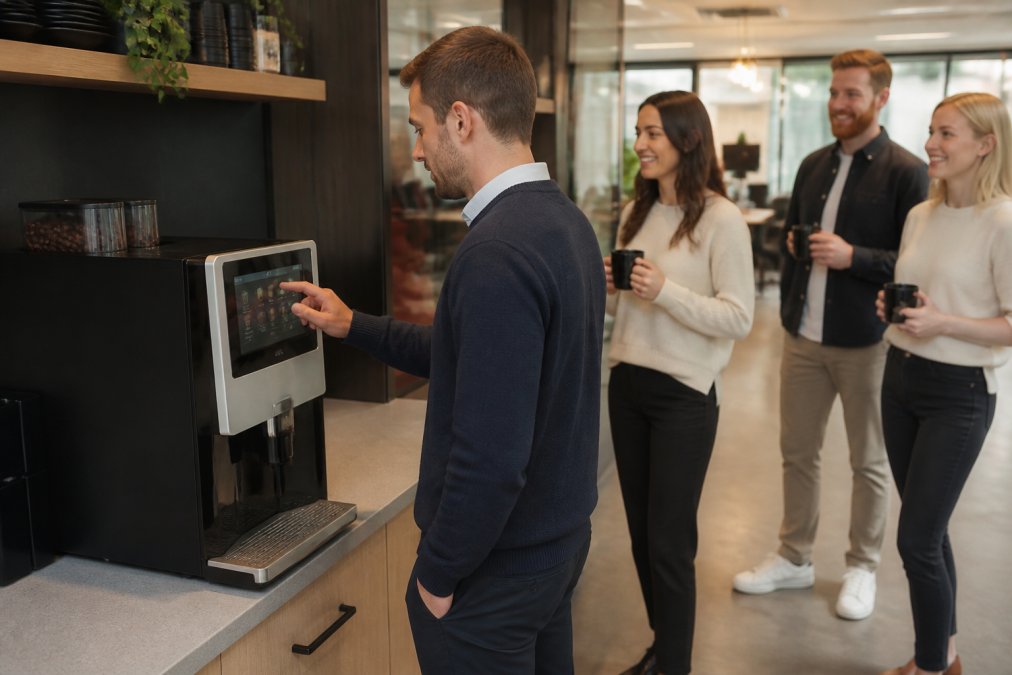
Tabletop units fit a standard kitchen counter without plumbing. Tank-fed models go anywhere with a power socket, though someone must refill the tank. Past roughly 50 drinks a day, plumbed-in is worth the installation cost (bsigroup.com).
Floor-Standing Machines for 100+ Drinks a Day
Floor-standing machines handle high footfall without constant attention. Larger bean hoppers, drip trays and cup capacity let them run a full working day between refills. Past 150 drinks daily, this format is the only sensible choice.
Step 3: Bean to Cup vs Pod Coffee Machines: Which Suits Your Kitchen?
Bean to cup machines grind fresh beans on demand and deliver barista-style drinks from one unit. Pod machines trade freshness for fast setup and minimal cleaning. The choice comes down to volume, quality expectations and staff time.
Bean to cup wins on quality, variety and cost per drink over time, since whole beans cost less per cup than sealed pods (the NHS). One machine produces espresso, americano, cappuccino and latte, with milk frothing systems handling textured milk. Trade-offs: higher upfront cost and a maintenance schedule covering descaling and grinder checks.
Pod systems suit very small offices or meeting rooms where demand is light and nobody wants to think about cleaning. They fall short on waste: used pods add up quickly, and the per-drink cost rarely competes at volume.
A common mistake is buying pods for a 60-person office to save money upfront. Six months later, the same team is back shopping for a bean to cup machine.
Step 4: Office Coffee Machine Leasing vs Buying: Run the Numbers
Office coffee machine leasing vs buying is a cash-flow decision as much as a financial one. Buying means one capital outlay and full ownership, but you carry the maintenance risk. Leasing spreads cost into predictable monthly payments and typically bundles service, installation, training and sometimes coffee supplies.
Leasing suits workplaces wanting fixed costs and no surprise repair bills. Buying works for businesses that prefer to own assets outright and can arrange their own servicing. The decision turns on the three-year total once consumables, service and downtime are included, not the headline figure.
What a Total Cost of Ownership Calculation Should Include
Most quotes only show the headline figure. A proper total cost of ownership calculation covers:
- Machine cost or monthly lease payment
- Installation, plumbing and any electrical work
- Coffee, milk and consumables per month
- Service contract and call-out charges
- Descaling, water filtration and replacement parts
- Staff time spent on refills and cleaning
- Downtime cost when the machine fails
How to Build the Three-Year Comparison Yourself
A TCO comparison only works if both options are measured over the same period against the same demand figure from Step 1.
- Fix the demand figure. Multiply your daily cup count from Step 1 by working days per year (typically 252 for a five-day office, fewer with closures).
- Convert consumables to a per-cup cost. Beans, milk, sugar and cups are the largest variable. Bean-to-cup consumables typically land below pod consumables at volume, since pods carry packaging and per-unit margin.
- Annualise the fixed costs. Lease payments, service contracts and filter replacements are monthly or annual, multiply them out to three years so they sit alongside the purchase price on the same basis.
- Add the soft costs. Staff time refilling tanks, emptying grounds and running cleaning cycles is real payroll cost. A tank-fed machine in a 60-person office can absorb 15-20 minutes daily; a plumbed-in unit with a large grounds container absorbs far less.
- Price the downtime. If the machine is out for a day and the team walks to a café, that lost time is the cost. A service contract with a defined response time insures against that line.
- Compare totals, not monthly figures. A lease that looks pricier per month often wins over three years once service, filters and call-outs are added to the purchase scenario.
Lease Structures You Will Encounter
Not all leases are the same, and the structure changes the TCO materially:
- Rental with service included, one monthly figure covering machine, service and often consumables. Easiest to budget, usually the highest headline cost.
- Lease with separate service contract, lower monthly machine cost, but you must budget the service separately and check what is excluded (call-outs, parts, labour).
- Bean-to-cup supply agreements, the machine is provided against a committed monthly coffee spend. Attractive at high volume, but read the minimum-spend clause carefully.
- Outright purchase with ad-hoc service, lowest upfront commitment, highest variance. Works for sites with a maintenance contact who can handle first-line issues.
Questions to Put to Any Supplier
- What is the total cost over three years at my daily cup count, including consumables and service?
- What is excluded from the service contract, call-outs, parts, labour, descaling visits?
- What is the guaranteed response time if the machine fails, and is there a loan unit?
- What happens at the end of the lease, return, renew or buy out?
- Are water filters and descaling included or billed separately?
Ask any supplier for the three-year total, not the monthly figure. A lease that includes service, filters and call-outs frequently costs less than a purchase plus ad-hoc repairs, but only if you compare like for like over the same period and the same cup count.
Admiral Vending’s AI-powered instant quote system builds this breakdown for your headcount, so you can compare lease and purchase on the same basis.
Step 5: Plan Installation, Water and Power Before Delivery
Installation planning prevents the most frustrating delays. Before delivery, confirm a suitable power supply, a water connection if plumbed-in, and enough clearance for ventilation and access.
Plumbed-in machines need a mains water feed, a drain and filtration to protect the boiler from limescale. Tank-fed models need only a standard socket, but daily refills. Check door widths and lift access on the delivery route, a floor-standing machine that cannot fit through the kitchen door is a problem no service contract solves.
Professional installation and operator training should be part of the package. If a supplier cannot tell you who will commission the machine and when, keep looking.
Step 6: Office Coffee Machine Maintenance Tips That Prevent Breakdowns
Office coffee machine maintenance tips matter more than most buyers expect. Most breakdowns we see trace back to skipped cleaning and neglected water filtration, not manufacturing faults.
The Daily Routine
- Rinse the drip tray and milk system daily, milk residue is the single fastest route to blocked frothers and off-tasting drinks
- Run the automated cleaning cycle as the machine prompts; most bean-to-cup units will lock out dispensing if it is ignored
- Empty and rinse the grounds container before it overfills, compacted grounds jam the chute and cause error codes
- Wipe the touchscreen and dispensing area weekly to stop sticky residue building up around the spout
The Scheduled Tasks
- Descale on schedule. Hard water areas need it more often than soft. If you do not know your water hardness, your water supplier publishes it by postcode area, it is a five-minute check that determines your descaling interval.
- Replace water filters at the recommended interval. A filter that is past its life stops protecting the boiler and starts harbouring the very scale it was meant to prevent.
- Check grinder burrs annually. Worn burrs produce inconsistent grind, which shows up as weak or bitter coffee long before the machine reports a fault.
- Book a professional service visit annually. A technician can reach components, boiler, pump, seals, that daily cleaning cannot.
Why Descaling Is the Task That Kills Machines
Limescale builds silently, restricting flow, forcing the pump to work harder and eventually blocking the boiler or heater. By the time a fault appears, the damage is done and the repair significant. Water filtration reduces descaling frequency, so it belongs in your total cost of ownership from day one.
A useful rule of thumb: if your area’s water is hard, budget for more frequent descaling and filter changes than the manual suggests. The manual is written for average water; your site may not be average.
The Cost of Skipping Maintenance
Neglect does not save money, it moves the cost. A machine that is not descaled or filtered fails earlier, usually during a busy period. The three costs of poor maintenance are:
- Repair cost, descaling and filter replacement are cheap; boiler and pump replacement are not
- Downtime cost, a machine out of action sends staff to a café, which is lost time and lost goodwill
- Replacement cost, a machine that fails at three years instead of seven has cost you the price of two machines
What Your Service Contract Should Cover
Check that your contract includes scheduled servicing, descaling visits, filter supply and a defined response time for call-outs. A contract that only covers ‘breakdowns’ but not preventive maintenance is not really a maintenance contract, it is a repair contract, and it will cost more over the life of the machine.
If your water is hard and you are not filtering, you are effectively descaling your boiler with every brew. The scale you cannot see is the scale that causes the failure.
A Simple Maintenance Calendar
| Frequency | Task | Who |
|---|---|---|
| Daily | Rinse drip tray and milk system, empty grounds | Staff |
| Weekly | Wipe touchscreen and dispensing area | Staff |
| Monthly | Check filter status, run cleaning cycle | Staff |
| Quarterly | Descale (hard water areas) | Staff or provider |
| Annually | Professional service, grinder check | Provider |
Keep this calendar beside the machine. A task that is visible gets done; a task that lives in a manual does not.
Step 7: Train Staff and Troubleshoot the Most Common Faults
Training takes less time than most managers budget for. A short session covering drink selection, milk refills, daily rinses and the cleaning cycle prevents the small errors that cause most call-outs.
The faults you will actually encounter are predictable:
| Symptom | Likely Cause | Fix |
|---|---|---|
| Weak or watery coffee | Grinder setting too coarse | Adjust grind finer |
| Machine will not start cycle | Water tank empty or filter blocked | Refill or replace filter |
| Slow dispensing | Limescale build-up | Descale the machine |
| Poor milk texture | Dirty milk frothing system | Run cleaning cycle |
| Error message on screen | Needs service | Contact your provider |
Keep a laminated card beside the machine with these fixes and your service contact. It saves a call-out for problems staff can solve in a minute.
A coffee brewer for office use only performs as well as the support behind it. Choose a provider that handles installation, training, service and supplies, so a fault becomes a phone call rather than a project.
Admiral Vending supplies commercial bean to cup machines built for exactly these requirements, backed by eight years of industry experience, professional installation, operator training and nationwide support.
Choosing the right coffee brewer for office use comes down to matching capacity to real demand, then planning the maintenance and support that keep it running. Get that wrong and you inherit queues, breakdowns and staff nipping out for coffee.
Admiral Vending makes the decision simpler with expert machine selection, professional installation, operator training, ongoing service support and coffee supplies, all from one provider. Our AI-powered instant quote system gives you a clear breakdown for your headcount in minutes.
Get your instant quote from Admiral Vending and give your team barista-style coffee without the guesswork.
Frequently Asked Questions
What is the best coffee brewer for office use?
The best machine depends on your daily cup count. A compact tabletop bean-to-cup model suits teams of 10 to 50, while floor-standing machines handle 100 or more drinks a day. Look for freshly ground beans, a milk frothing system and a service contract that covers descaling and water filtration. Admiral Vending offers a range of bean-to-cup machines for different workplace sizes and can advise on the right fit.
Should I lease or buy a coffee brewer for office use?
Leasing spreads the cost monthly and usually bundles servicing, coffee supplies and repairs into one payment, which suits offices that want predictable outgoings. Buying makes sense if you plan to keep the machine for many years and are comfortable arranging your own maintenance. Compare the total cost of ownership over three to five years, including descaling, filters and call-out charges, before deciding.
How do I maintain a commercial bean to cup coffee machine?
Daily tasks include emptying the drip tray, rinsing the milk frothing system and running the automated cleaning cycle. Weekly, check grinder settings and wipe the touchscreen. Monthly, inspect the water filtration and descale when prompted. A service contract covers deeper work such as seals and brewing technology checks. Skipping descaling is the most common cause of breakdowns and slow output.
How many cups per day can an office coffee machine handle?
Compact tabletop bean-to-cup machines typically manage around 50 to 80 drinks daily, while higher capacity tabletop and floor-standing models handle 150 to 300 or more. As a rule, plan for 3 to 4 drinks per person per day. A 150-person office should target a machine rated for at least 300 cups daily to avoid queues at peak times.